> ## Documentation Index
> Fetch the complete documentation index at: https://docs.testgenai.com/llms.txt
> Use this file to discover all available pages before exploring further.
# Rebuild Checklist
> The Rebuild Checklist feature allows you to generate a completely new set of Checklist for a feature, based on the original requirements. This process ignores all current Checklist and test cases, essentially giving you a “fresh start” while preserving previous versions for reference.
## 1. How to Use Rebuild Checklist
1. On the feature details page, click the **three dots ("...")** menu located between the download and settings icons.
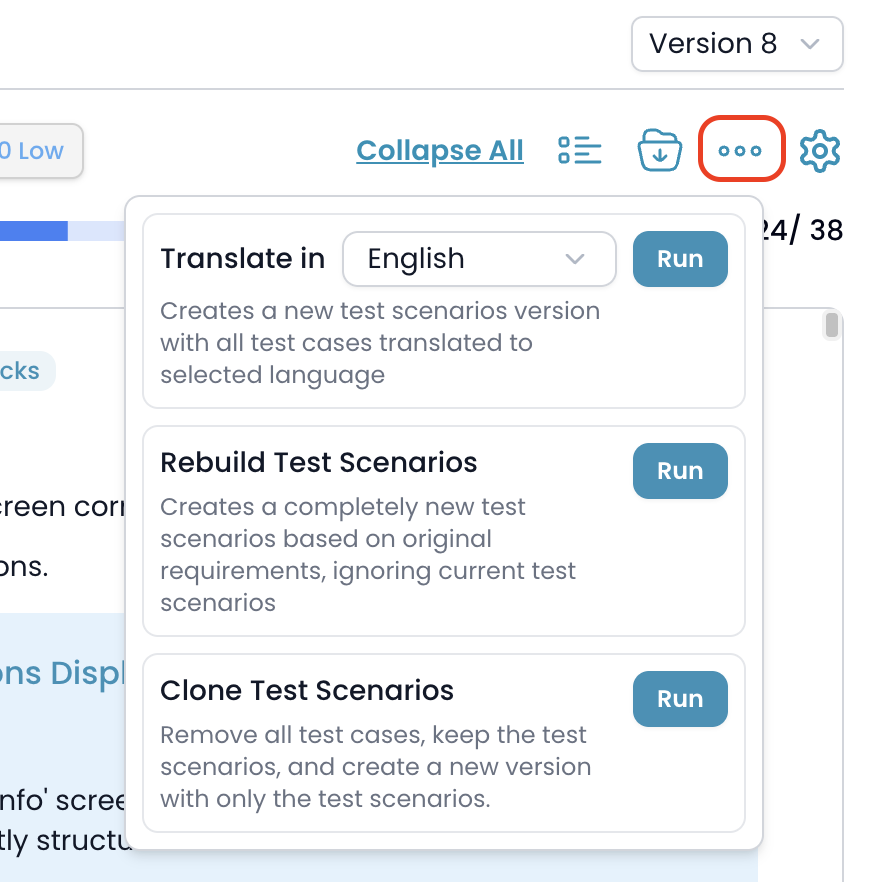 2. In the dropdown, find the **Rebuild Checklist** option.
3. Click the **Run** button next to this option.
## 2. What Happens When You Rebuild?
* The system will send your feature and project information to the AI engine.
* The AI will analyze your original requirements and **create an entirely new set of checklist**, ignoring any existing checklist or test cases.
* After completion, a **new version** is automatically created containing only the newly generated checklist.
* Your previous versions remain fully accessible for reference or rollback.
## 3. Timeline Integration
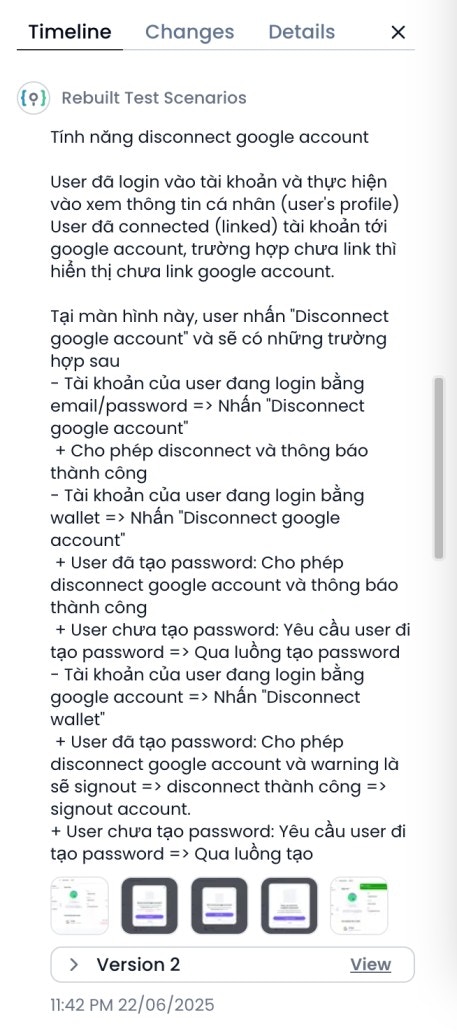
* After the rebuild is done, an entry will appear in the **Timeline** tab showing that the checklist have been rebuilt for this feature, including a summary of the generated checklist and any related attachments or screenshots.
2. In the dropdown, find the **Rebuild Checklist** option.
3. Click the **Run** button next to this option.
## 2. What Happens When You Rebuild?
* The system will send your feature and project information to the AI engine.
* The AI will analyze your original requirements and **create an entirely new set of checklist**, ignoring any existing checklist or test cases.
* After completion, a **new version** is automatically created containing only the newly generated checklist.
* Your previous versions remain fully accessible for reference or rollback.
## 3. Timeline Integration
* After the rebuild is done, an entry will appear in the **Timeline** tab showing that the checklist have been rebuilt for this feature, including a summary of the generated checklist and any related attachments or screenshots.
 **Note:**
* Use this feature if requirements have changed significantly, or if you want to start over with a new checklist structure.
* The system ensures older versions are kept safe, so you can always compare or revert if needed.
***
***
**Note:**
* Use this feature if requirements have changed significantly, or if you want to start over with a new checklist structure.
* The system ensures older versions are kept safe, so you can always compare or revert if needed.
***
***